
A mix beyond algorithms
Visual activities span JavaScript fundamentals, algorithmic patterns and Big O, developer terminology, accessibility, design systems, architecture, AI product engineering and engineering judgement.
iPrep
Engineering learning and interview practice
A learning playground for curious engineers. Break a feature, spot the pattern, try real code and explain your decisions. Keep interview practice close to the work you are learning to do.
Play in your browser. Spoken practice is also available on iPhone.
A small first step
Open the Learning Playground in your browser and press Start. Quick Five, Daily Mix and Deep Dive choose a varied session across JavaScript, coding patterns, design, systems and AI.
From download to doing
Press Start for a varied Daily Mix. Explore a visual model, recognise a pattern or investigate a surprising result before you reach for code.
Change an experiment, debug a challenge or implement real JavaScript. The feature studio adds a typed React component, state model and CSS you can edit and operate.
Try unfamiliar inputs, use progressive hints when you need them and explain the decisions you made. Return to spoken practice to rehearse your own examples.
A closer look
Visual activities span JavaScript fundamentals, algorithmic patterns and Big O, developer terminology, accessibility, design systems, architecture, AI product engineering and engineering judgement.
Operate real React controls, edit TypeScript and CSS, and decide when a simulated save succeeds or fails. Check the behaviour, then handle a changed brief.
Work through a product problem from observation to implementation and explanation. Search ownership, retrieval evidence, accessible components and reliable order processing connect code to engineering decisions.
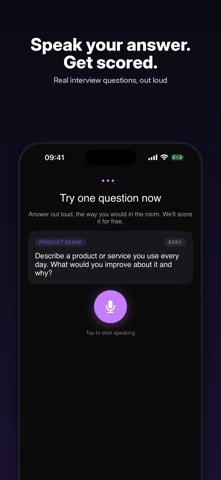
The released iPhone app keeps question banks, spoken answers, transcripts and practice feedback. The newer native learning experience is currently being tested through internal TestFlight.
When you want more
Explore the Learning Playground in your browser. The iPhone app keeps spoken interview practice, with optional iPrep Pro for unlimited scoring and question banks, mock interviews, spaced repetition and advanced feedback. Current offers are shown in the app.
View iPrep on the App StoreGood to know
Open the Learning Playground above and press Start. You can use a browser on your Mac or iPad. Choose Quick Five for a shorter session, Daily Mix for variety, or Deep Dive for more time with a topic.
No. You can learn by changing visual models, spotting patterns, debugging, recognising terminology and weighing product decisions, alongside writing real code.
These deeper workspaces currently save in the browser or device you use. Shared Mac and iPad workspace sync is still being built. Keep private backups of work you want to preserve.
The App Store app includes spoken interview practice and question banks, with optional Pro features. The expanded native Learning Playground is currently in internal TestFlight; the browser is the public way to try the new learning experience.
iPrep, by Lunar Computing